
How to Spot a Good Vintage Digicam and Avoid Common Problems
Buying an older digital camera can be one of the most enjoyable ways into photography, but there is a big difference between finding a camera that looks good in a listing and finding one that is genuinely ready to use.
A vintage digicam may already be twenty years old or more. During that time batteries can deteriorate or leak, chargers can disappear, LCD screens can age, motorised lenses can become unreliable and memory-card standards can move on. None of that means you should avoid older digital cameras. It simply means that condition and compatibility matter more than they do when buying something new.
If you are still deciding which type of digicam would suit you, start with our guide to the best vintage digital cameras for beginners. If you already have a particular camera in mind, these are the things worth checking before you buy it.
Before You Buy: The Checks That Matter Most
The most important thing is to look beyond megapixels and cosmetic condition. A useful vintage digital camera needs to power on reliably, take and save photographs, focus correctly, operate its lens and flash, accept a memory card you can still obtain, and use a battery or charger that will not turn into a hunt for obsolete accessories.
That may sound like a long list, but most of these checks take only a few minutes. They can also be the difference between buying a camera you immediately enjoy and buying something that spends the next six months in a drawer while you search for the right battery, charger or memory card.
Start With the Battery and Power Supply
A seller saying that a camera “powers on” is useful, but it does not tell you the whole story. Ideally, the camera should start normally several times, remain switched on and allow you to take, save and review photographs without suddenly shutting itself down.
Older compact digital cameras normally use either standard AA or AAA batteries or a proprietary rechargeable battery pack. Cameras using ordinary batteries can be particularly convenient today because replacements remain easy to find. Proprietary batteries are not necessarily a problem either, but check that a working battery is included and that a replacement battery and charger are still available for the model.
The battery compartment deserves a proper look. Check the metal contacts and surrounding plastic for white powdery residue, green or blue corrosion, staining or signs that an old battery has leaked. Light cosmetic wear is normal on a camera of this age; heavy corrosion around the power contacts is different and can affect reliability.
Also open and close the battery door rather than simply looking at it. Small plastic catches can become brittle with age, and a camera with a perfectly good sensor and lens is not much use if the battery will not stay securely in place.
Check Which Memory Card the Camera Actually Needs
Memory cards are one of the easiest things to overlook when buying a vintage digicam.
Older digital cameras used a surprisingly wide range of storage formats, including SD, CompactFlash, Sony Memory Stick and xD-Picture Card. Even when a camera accepts an ordinary-looking SD card, you should not assume that any modern card will work.
The original SD standard was followed by SDHC and later SDXC, and older cameras may not support those newer formats or capacities. In practical terms, a current high-capacity card can be physically the right shape but still be incompatible with the camera.
Before buying, check the manual or a reliable specification for both the type of memory card and the supported capacity. That small check can save a lot of frustration later.
Where compatible, Film Camera Store also stocks memory cards and card readers for storing and transferring digital photographs. Always confirm compatibility with the individual camera before choosing a card.
It is also worth thinking about how you will get the photographs off the camera. A card reader can often be considerably easier than trying to find a proprietary USB cable that disappeared years ago.
Test the Lens and Zoom Properly
The retracting lens mechanism is one of the areas I would pay closest attention to on an older compact camera. When you switch the camera on, the lens should extend smoothly and settle into position without grinding, repeated clicking or obvious hesitation. When the camera is switched off, it should retract normally.

If the camera has optical zoom, run it from one end of its range to the other several times. It should move consistently rather than juddering, stopping halfway or producing an error.
A camera that occasionally needs a tap or a second attempt to make the lens extend is not simply displaying vintage “character”. It is showing you a fault that is unlikely to improve with age. Sand, dirt, impact damage and wear to the tiny moving components inside compact lens mechanisms can all cause problems.
Do not pull or push an electrically powered lens into position to make it work. If the camera cannot extend and retract its own lens consistently, I would treat that as a genuine fault.
Make Sure It Can Focus and Take Real Photographs
A camera can look perfectly healthy while you move through its menus and still have problems when you actually try to take photographs. The best test is therefore the obvious one: take some pictures.
Photograph something reasonably close, then something further away. Give the autofocus time to lock and repeat the test at different zoom settings if the camera has an optical zoom.
Do not judge an old five or six-megapixel compact by modern smartphone standards. A slightly softer or more processed-looking image may simply be part of the camera's character. What you are looking for is consistent failure to focus, one side of the photograph being unusually blurred, strange lines or patches in the recorded image, or photographs that cannot be saved properly.
Take several pictures in succession as well. This helps reveal cameras that freeze, shut down, show card errors or behave normally for one photograph and then fail on the next.
Test the Built-In Flash
For many people buying a vintage digicam today, the flash is not an occasional extra — it is one of the reasons they want the camera in the first place. The bright foreground and darker background produced by direct flash are a big part of the 2000s compact-camera look.
Switch the flash on deliberately rather than relying only on Auto mode and take several photographs. It should charge, fire and then become ready to fire again. A very slow recycle time can sometimes simply mean weak batteries, so if the camera uses replaceable batteries it is worth repeating the test with a fresh set.
Also inspect the flash window itself for cracks, damage or obvious signs of moisture. A camera may still be perfectly usable without flash, but if the direct-flash look is what attracted you to digicams in the first place, a failed flash changes the usefulness of the camera considerably.
Look at the LCD — Then Look at the Saved Photograph
A tiny, low-resolution LCD is completely normal on a 2000s digital camera. A damaged display is something else.
Check the screen while moving through a plain menu as well as when reviewing photographs. Look for large dead areas, permanent vertical or horizontal lines, severe colour changes or dark patches that make the display difficult to use.

There is an important distinction between a screen fault and a fault in the photograph itself. If a line or colour problem appears on the camera's LCD but disappears when you view the photograph on a computer, the display is probably responsible. If the same problem appears in the saved image, you may instead be looking at an image-sensor or processing fault.
Inspect the Lens for Scratches, Haze and Contamination
The front element on many compact cameras is small, which can make even minor cleaning marks look dramatic when you inspect them closely. A few light marks do not automatically mean the camera will produce poor photographs.
What deserves more attention is a deep scratch, heavy haze, obvious fungus or contamination inside the lens. Internal dust or haze is much more difficult to deal with on a compact camera because the lens is not designed to be removed like an interchangeable camera lens.
Take a photograph of an evenly lit bright scene and look at the result. Persistent dark spots, a heavily misted appearance or one area that is consistently much softer than the rest may indicate something more than ordinary age.
Try Every Button, Dial and Door
It is easy to become so focused on the lens and sensor that the smaller controls get forgotten. Work through the buttons before you buy if possible: playback, menu, directional controls, zoom buttons, flash settings, mode selectors and the shutter release itself.
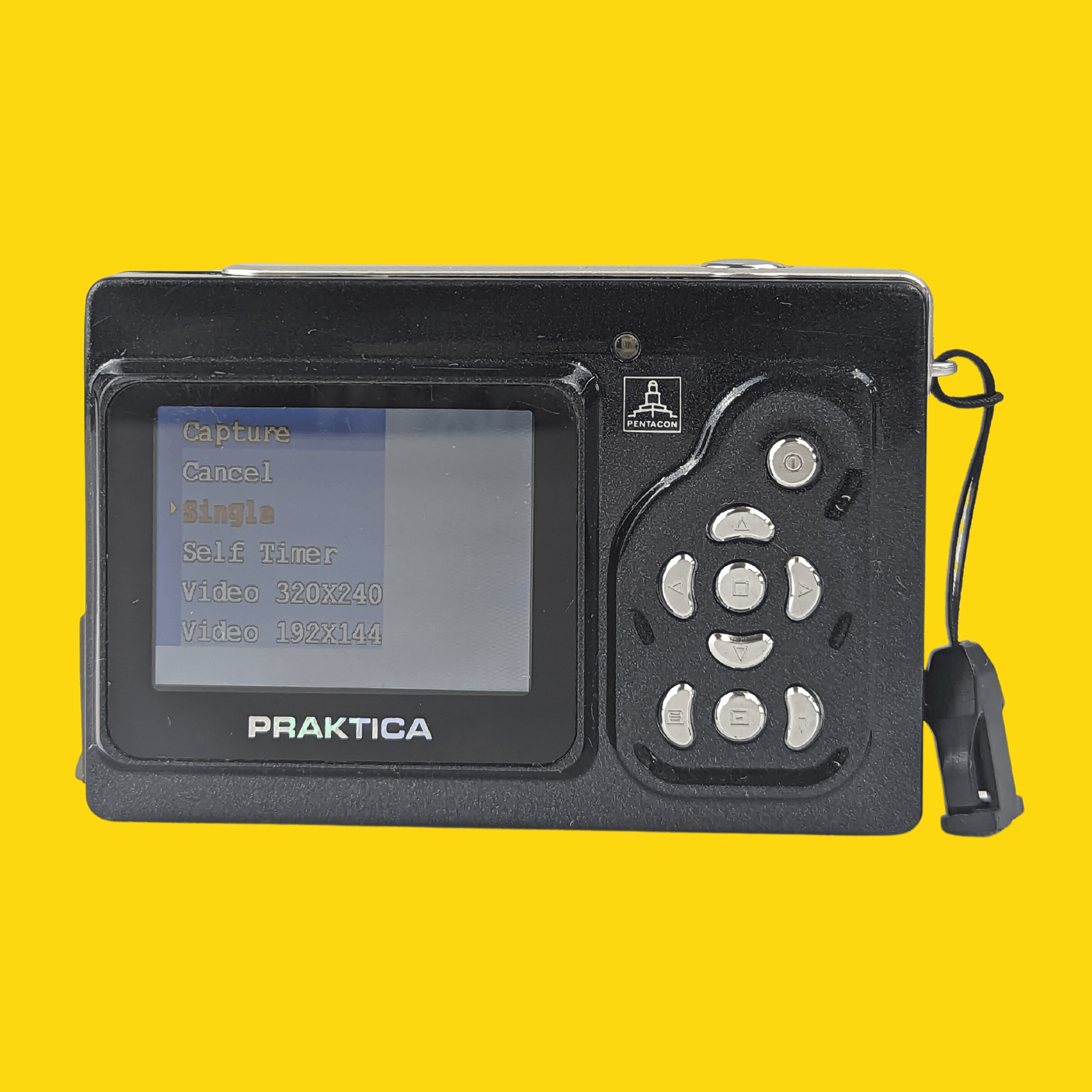
A slightly worn button may be perfectly acceptable if everything works, but intermittent controls can quickly become frustrating on a camera where almost every setting is accessed through the rear menu.
Check the memory-card door and any USB or AV covers at the same time. Look for broken catches, damaged contacts, dirt or signs that the camera has been dropped or stored somewhere damp.
Cosmetic Wear Is Not the Same as a Fault
One thing worth keeping in perspective is ordinary wear. A vintage compact that spent years being carried in pockets, handbags and backpacks may have scratches, worn paint or marks on its body. Those things often tell you very little about whether it will take good photographs.
What matters more is functional damage: corrosion around contacts, a lens that will not extend, a cracked battery door, intermittent buttons, an unusable LCD or a camera that cannot reliably save images.
In other words, I would rather buy a slightly scruffy camera that has clearly been tested than a pristine-looking one whose seller cannot tell me whether the flash or memory-card slot works.
Check What Comes With the Camera
A bargain can become considerably less of a bargain once you discover that you also need a battery, charger, unusual memory card and card reader before you can take a single photograph.
If the camera uses a proprietary rechargeable battery, check whether the battery and charger are included. If it uses a less common storage format such as Memory Stick or xD-Picture Card, find out whether a suitable card comes with it or whether you can obtain one easily.
You do not necessarily need the original box, software CD or printed instruction manual. The items required to power the camera, take photographs and retrieve those photographs are much more important.
Ask to See a Photograph Taken With the Actual Camera
If you are buying privately or through an online marketplace, one of the simplest useful questions is: “Can you show me a recent photograph taken with this camera?”
That does not prove that every single function works, but it tells you much more than a photograph of the camera sitting switched off on a table. Ideally, ask for an ordinary daylight photograph and, if flash is important to you, one taken using the built-in flash.
Phrases such as “it worked the last time I used it”, “powers on” and “untested” should not be treated as the same thing as confirmation that the camera takes, records and plays back photographs correctly.
What Does “Untested” Really Mean?
When an older digital camera is described as untested, I think it is safest to read that word literally: its working condition is unknown.
That does not automatically mean the camera is broken. A private seller may genuinely have lost the charger or no longer own the memory card needed to test it. But it also means you do not know whether the flash fires, the lens zooms, the autofocus works or the camera can save an image.
If the price is low enough and you enjoy taking a chance on older electronics, an untested camera can be an interesting gamble. If you simply want your first digicam to arrive and work, paying more for a properly checked example will usually make more sense.
Vintage Digicam Buying Checklist
| Check | What you want to see | Warning signs |
|---|---|---|
| Power | Starts consistently and stays switched on | Random shutdowns or intermittent power |
| Battery compartment | Clean contacts and secure door | Leakage, corrosion or broken catch |
| Memory card | Correct format and supported capacity | Card errors or incompatible modern card |
| Lens and zoom | Smooth extension, retraction and zoom | Grinding, sticking or lens errors |
| Autofocus | Locks consistently at different distances | Repeatedly blurred or unfocused images |
| Flash | Charges and fires repeatedly | Failure to fire or repeated errors |
| LCD | Readable menus and image playback | Large dead areas, lines or severe fading |
| Controls | Buttons and switches respond consistently | Sticky, intermittent or failed controls |
| Saved photographs | Files save, play back and transfer correctly | Corrupted images, failed saves or unexplained artefacts |
Why Buying a Tested Vintage Digital Camera Matters
Part of the appeal of buying vintage is finding something unusual, and there is nothing wrong with taking a chance on a cheap marketplace camera if you understand the risk. For a beginner, though, a properly tested camera removes a lot of unnecessary uncertainty.
There are several separate systems working together in even a simple digicam: power, lens movement, autofocus, flash, LCD, buttons, storage and the image sensor itself. A camera can therefore power up successfully while still having a fault somewhere else.
Film Camera Store camera listings state that used cameras are tested and cleaned before sale and are supplied with a functional guarantee. Where suitable stock is available, you can browse our digital camera collection to see the current range of compact digital cameras and accessories.
Does CCD Matter When Buying a Vintage Digicam?
You may also be looking specifically for a CCD camera because of the colours and early-digital character associated with many older compacts. Sensor type can certainly form part of your decision, but I would put basic condition and usability first.
A desirable CCD sensor is not much use if the lens mechanism is failing, the required battery is unobtainable or the camera cannot reliably save a photograph.
Our CCD digicams explained guide looks separately at CCD versus CMOS and why the sensor is only one part of what gives older digital cameras their distinctive look.
Final Thoughts: Condition Comes Before Hype
It is easy to become caught up in particular brands, megapixel counts or whichever old digicam happens to be fashionable at the moment. With ageing digital cameras, however, a less fashionable model in genuinely good working condition can be a much better purchase.
Check that the camera powers up reliably, inspect the battery compartment, confirm the battery and charger situation, find out exactly which memory card it needs, test the lens and autofocus, fire the flash, inspect the LCD and make sure it can actually take and save photographs.
If those basics are right, you are already most of the way towards finding a vintage digicam you can enjoy rather than one that spends its life sitting in a drawer.
If you are still deciding which type of camera to choose, return to our beginner's guide to choosing a vintage digicam, or browse the Film Camera Store digital camera collection.
(FCS-B-103)